From your photo to center stage
Choose your photo
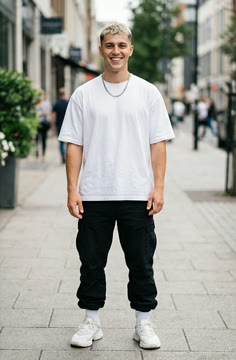
Upload one person, with a visible face and a clear outfit. The photo supplies the lead; the other dancers stay in the scene.
Create your performance
Check the credit cost shown above, then create the 15-second dance. A confirmed failed generation returns its credits.
Watch and save
Watch the finished clip with music and download a copy you like. AI can change faces or details, so check the result before sharing.
What is the Talk Dirty Dance AI trend?
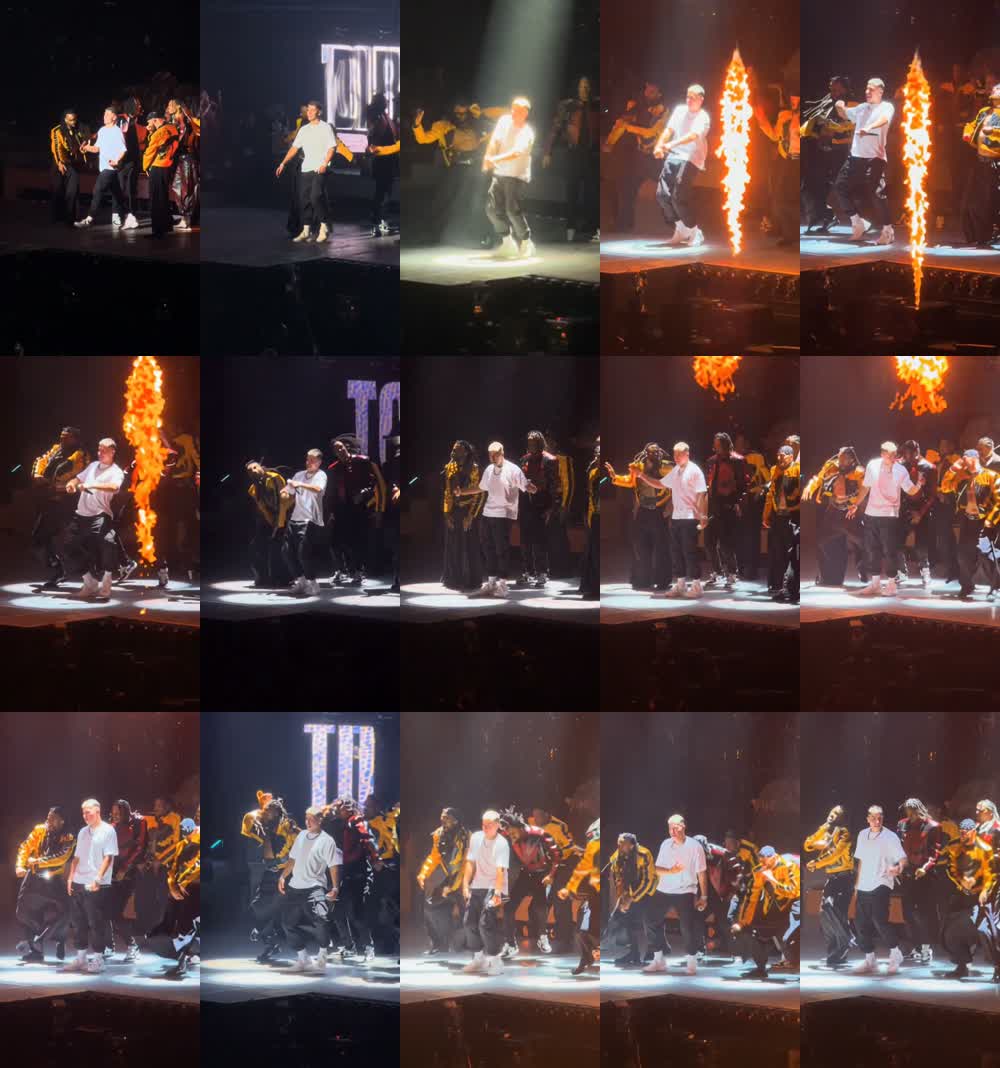
The joke lands as soon as you recognize the headliner. A familiar person walks into an oversized concert moment: a spotlight, dancers moving behind them, then columns of fire beside the stage. The scene has the energy of a tour finale; the star might be the friend who usually refuses to dance. Changing that one person gives an already dramatic performance a completely different personality.
The name comes from Talk Dirty, the Jason Derulo song featuring 2 Chainz. Social edits use the concert setting as a backdrop for photo-based character replacement. This template follows that central-performer idea, using a prepared dance sequence rather than asking you to learn the routine or film a performance. The example above is already an AI edit.
Pick a photo your friends will recognize
Start with the person who makes the casting funny. Your own everyday outfit can work better than a stage costume because the contrast is instantly clear. A sibling in their favorite jacket, a friend dressed for a wedding, or your own very serious profile photo each gives the same dance a different setup. Ask permission before using somebody else's image.
Choose a sharp half-body or full-body photo with one visible face. Keep hair, shoulders and clothing clear, and include shoes if they matter to the joke. A tight face crop leaves the body and outfit for the model to invent. Dark glasses, hands across the face and heavy blur also hide useful detail. If your starting image is a group shot, crop it to the intended lead first. The upload accepts JPG, PNG or WebP files up to 10 MB.
One new lead, a whole concert around them
Your photo fills one role: the foreground performer at the center. The four backing dancers belong to the prepared scene, so there are no extra photo slots to fill and no positions to assign. The dance reference supplies the movement, camera framing, stage lights and fire cues. The editing instructions ask to keep those elements around the replacement lead.
Watch the brightest and darkest moments when reviewing your result. A face that looks convincing at the opening can change after a turn or flash of light. Check that the same person returns, their clothing stays recognizable, their hands move naturally and the dancers behind them keep separate faces. These checks are especially useful for this busy stage scene, where bodies overlap and the lighting changes quickly.
A short dance with its soundtrack
The clip runs for 15 seconds in a vertical 9:16 format, with music included. Play the example with sound to hear the excerpt and see how it accompanies the moves and fire bursts. This template uses a fixed soundtrack, so there is no need to find a song or upload your own audio.
Let the music carry the reveal. If you later add a spoken introduction in an editor, leave enough space for the dance to start rather than covering the entire excerpt. Keep a downloaded copy with the included audio before experimenting. Music availability on social platforms can vary by region and account type; having a downloadable clip does not grant separate music licensing rights.
Make the reveal work on a phone screen
A short caption gives the viewer a reason to recognize the new performer: your friend after one good exam result, the quiet colleague at the party, or you imagining your first world tour. Put the caption above the lead's head or in the surrounding space so the face, feet and flames can still be seen. You can add that text in your preferred editor after downloading.
For a small series, use a different consenting person in each video and keep the caption style consistent. Each version is its own generation; the template changes one lead at a time. The vertical shape fits the usual TikTok, Reels and Shorts presentation. Preview the post inside the destination app too, since its buttons and description can cover the lower part of the frame. Label the performance as AI-generated when sharing it.
Know the cost before starting
The current cost is 20 credits for one video, shown beside the creation button. Sign in to use your account balance; you can check credit packs from the site's pricing section. Making another version is a new generation at the price displayed when you start it.
If a generation is confirmed as failed, the credits charged for it are returned. A result still being processed needs a status check first. Use Refresh status on the existing task, or contact support with its task ID if it remains stuck. If the video is ready but its music or save step needs another attempt, the existing task can retry that step without another generation charge.
Your photo, draft and finished video
Selected photos can remain in a draft in this browser for one hour, including while you sign in. This helps you return to the upload you were preparing. It is a local draft, so another browser or device may need the photo again. The optional phone-upload entry transfers a photo into the selected slot; it does not start video creation by itself.
Creating the video sends the photo to the generation provider. Finished videos are available here for 30 days and use a shareable media link. Anyone who receives that link may be able to open it, so treat it as something you choose to share. Download the version you want to keep. Choose a different photo if the image contains sensitive details you would not want in the finished performance.
Talk Dirty Dance AI: practical questions
Do I need to film myself dancing?
No filming is needed. Upload a still photo of one person; the prepared concert sequence supplies the dance. The page already has the editing instructions, reference clip and soundtrack, so you can begin without writing a prompt or finding a separate video.
Can I put my pet on this stage?
This version is for one human lead. It has no cat or dog mode. If you want a pet dance, try the Toc Toc or Babydoll templates linked below, where people and pets have their own supported options.
Can my friends and I all appear together?
Only one uploaded person takes the lead here. The surrounding performers come from the dance reference. For a group-chat challenge, make separate videos with each friend's permission; for a shared cast, the Babydoll page offers one to three participants.
Does MemeClip add a watermark?
MemeClip does not add a watermark to this video. Lettering already visible on the stage screen belongs to the reference scene. A social app may add its own interface or marks when you publish or download through that app.
Is the video free to make?
Generation uses credits, with the current cost shown beside the creation button. You can choose your photo and view the example before creating anything. Sign in to check your balance and review the price when you submit.
What if creation fails or takes a long time?
Credits return when the generation is confirmed as failed. If it is still pending, refresh its status before creating another version. Keep the task ID for support. An unfinished music or save step can be retried on that task without charging for a second generation.
Which song is this dance based on?
The trend takes its name from Talk Dirty by Jason Derulo featuring 2 Chainz. This template includes the prepared excerpt heard in its preview. It makes a short dance edit, rather than a full-length music video or a new recording of the song.
Why might the face or outfit change?
The model must recreate the person through turns, overlapping dancers and strong light changes. A clear photo with visible clothing gives it more useful detail. Review the entire clip, especially after the dark or bright moments, before deciding whether to share it.
How do I save and share the finished clip?
Open the result player, watch it with sound and use Download video to save a copy. Videos stay available here for 30 days. Keep the media link private if you want to limit who sees it, and identify the performance as an AI edit when posting.
Is the example a real recording of the person in the photo?
It is a third-party AI replacement example with its published input photo and a source link. It shows the intended casting idea. It is not presented as an untouched concert recording or as a result generated by MemeClip.