From group photo to group performance
Choose your trio
Pick one picture containing all three adults. Their faces should be sharp and separate, with enough room to see each person's hair, shoulders and clothing. A standing group photo gives the dance more information than a tightly cropped selfie.
Check the opening places
Read the photo from left to right. The person on the left takes the opening left dancer, the middle person takes the center, and the right person takes the right. They keep their identities as the routine changes their places.
Make it, then watch it
Sign in, check the credit price and start your video. When it finishes, watch all three faces through the turns, listen to the music and download the MP4. Save the file before sending your favorite moment to the group chat.
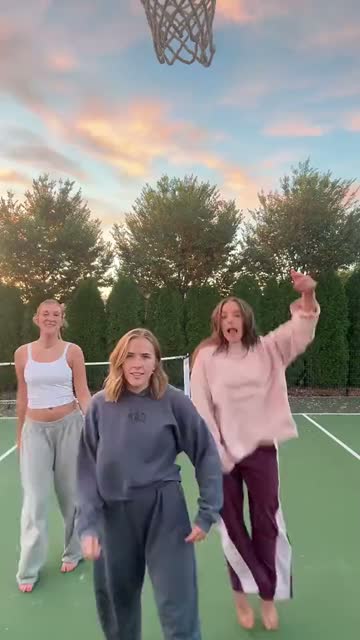
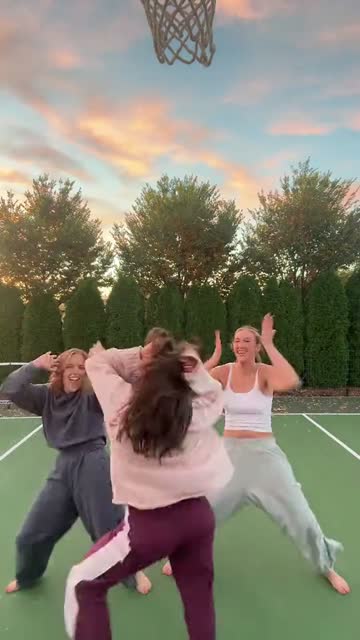
What is the Chipmunks Dance trend?
Three friends, a high-pitched chorus and a few very committed turns: that is the appeal of this dance. The reference used here takes place on a green outdoor court under a pink evening sky. The dancers point, spin and trade the foreground while the camera stays in one place. It is a small group performance with plenty happening inside the frame, rather than a solo dancer repeating one gesture.
The sound is the Chipmunks version of “You Spin Me Round (Like a Record),” a song originally recorded by Dead or Alive. The fast, squeaky vocal gives the ordinary court scene its comic energy. In this AI version, your three people take the dancers' places. The name describes the music and meme; it does not mean your friends grow fur, become animated chipmunks or get the film characters' outfits.
A good group photo gives everyone a fair turn
Look for a picture where nobody is hiding behind someone else's shoulder. All three faces should be large enough to recognize when you zoom in, but the image should still show their bodies and clothes. A full-length shot is useful because this routine includes arms, feet and turns. If your best picture ends around the waist, expect the lower half of each outfit to be invented.
Even lighting is more useful than a dramatic filter. Avoid mirrored sunglasses, heavy blur and very small faces in a crowded party photo. Crop away extra people so the intended trio is unambiguous. You can prepare that crop before uploading; there is no separate face-by-face casting panel here. The template accepts one group picture, not three individual portraits, and the first version is designed for three adults rather than pets or a single person.
Photo left
Opening left dancer
Photo center
Opening center dancer
Photo right
Opening right dancer
Four moments to spot in the routine
00:00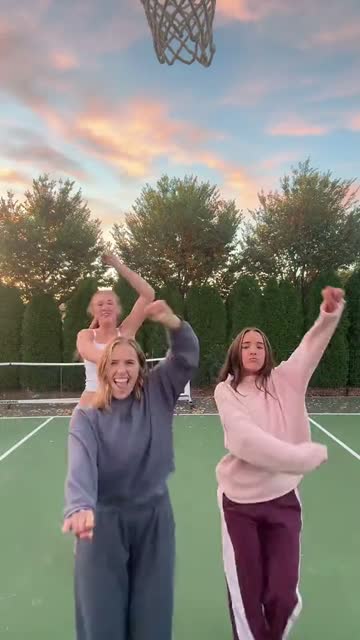 00:0300:06
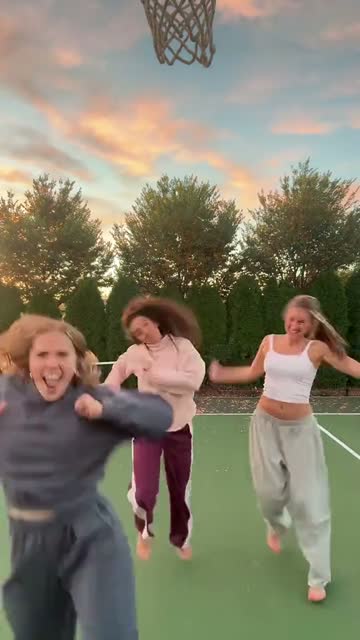 00:10
Start with the opening lineup. It is the easiest place to compare the three people in your photo with their assigned dancers. The person who starts on the right then moves into the foreground; the middle of the clip includes turns that briefly hide faces. Later, the opening center dancer comes nearer the camera. These changes make a group dance entertaining, and they are also the moments worth reviewing closely in your result.
The four stills show moments from the actual reference, not four scenes you need to assemble. Your output follows one continuous 14-second passage at its original pace. The court, evening light and camera position stay part of the template. Uploading a beach photo or a birthday picture supplies the cast; it does not move the routine to the beach or turn it into a birthday venue.
Keep the squeaky chorus and the original pace
The music is part of why the joke works. A serious-looking group doing these quick turns feels very different when the familiar high-pitched vocal starts. The download includes the matching passage of reference audio, so you do not have to search for the song just to watch your video. The dance stays at the reference speed; the template does not stretch a longer routine to squeeze it into fourteen seconds.
If you want to post with the platform's own licensed sound, you can choose that sound in your social editor and line up the first beat. Listen for doubled vocals if both audio tracks remain active. Keep one clear soundtrack, and check a full playback after editing. Music availability and posting rules vary by platform and region, so a downloaded track does not guarantee that every upload will keep its audio.
Make the casting the punchline
The simplest idea is often your actual friend group in an unexpected setting. Try a holiday photo of three friends who never volunteer to dance, or a dressed-up dinner picture that makes the casual court routine feel even funnier. An adult siblings' photo can work well too: the shared expressions make the group feel familiar before the first spin. Choose the picture together if you plan to share the result beyond your own chat.
You can add a short caption in the app where you post, such as “the group project finally rehearsed.” Leave enough screen space for the dancers' faces and hands. The generator does not add your caption, names or stickers to the video. A readable line above the clip usually does more for the joke than several labels following each dancer around the screen.
Watch the turns before you share
1 group photo · 3 dancers · 14 seconds · 720p · vertical MP4 · music included
The result is a vertical 720p MP4, suited to phone viewing and short-video editors. Play it once with sound before uploading it anywhere. Check that all three people remain distinct, especially when someone crosses another dancer or turns their back. Faces, hands and clothing may change during an AI-generated movement; reviewing only the opening frame will miss those details.
Download a local copy while the result is available. Saved results are kept for 30 days, which is useful for coming back later but is not a permanent photo album. If a messaging app makes the video look soft, send the downloaded file rather than a screen recording. For a different aspect ratio or an opening caption, use your usual editor after download and preview its crop so no dancer disappears at the edge.
THIRD-PARTY PET REMIX
Three kittens take their turn
Pink, purple and green outfits turn this version into a tiny dance troupe. Three AI kittens share an indoor hallway, taking turns at the front as the Chipmunks version of “You Spin Me Round” plays. The familiar song and spinning movement carry the joke into a completely different setting. Watch how the bright costumes help you follow each kitten when they change places.
This third-party pet remix shows another way people play with the meme. The linked TikTok repost credits @meowtakeover; it was not generated by MemeClip. Our template follows the human dance on the sunset court and takes one group photo of three adults. For that scene and its fourteen-second sequence, use the reference beside the upload tool.
Check the price, then start one video
The current generation price is 20 credits, also shown next to the tool before you begin. You can choose your picture before signing in, then return to the page to submit it. If the price changes while the page is open, the tool asks you to check the updated amount before sending a new request.
Once a request is running, use Refresh status to follow it instead of starting a second copy. A confirmed failed generation returns the credits for that request. A request still being checked needs a status update first. If the dance is ready but adding the soundtrack needs another attempt, the tool retries that finishing step rather than asking you to pay for the dance again.
A shared photo deserves a shared yes
Ask all three adults before uploading their picture, especially if the finished joke will appear on a public profile. Use a photo you are allowed to upload and choose a setting everyone is comfortable with. An affectionate private joke and a public post can feel quite different to the people pictured.
The browser can keep a temporary photo draft for up to one hour so signing in does not necessarily mean selecting the file again. That convenience is separate from the 30-day availability of a saved result. Download the finished video if you want to keep it, and avoid treating the result link as a permanent archive. The privacy policy explains how uploaded files and account information are handled.
Chipmunks Dance questions before your first spin
Do I upload one photo or three?
Upload one group photo containing exactly three adults. There are no separate portrait slots in this template.
Who becomes each dancer?
The photo's left, center and right people take the reference's opening left, center and right positions. Their identities should follow them as they move.
Will we turn into cartoon chipmunks?
No. The template casts people in the human court dance. Chipmunks refers to the song version and trend name.
Can I use a solo photo or pets?
This version is for three adult people together in one picture. Choose another template for a solo subject or a pet.
What kind of group picture works best?
Choose a sharp, well-lit photo with all three faces unobstructed. Standing, full-length pictures provide useful information for the turns and outfits.
How long is the downloaded video?
It is a 14-second vertical 720p MP4. The download includes the matching passage of music from the reference.
Can I change the court or write different dance moves?
This is a fixed video template. Your photo changes the cast; the court, routine and camera movement follow the reference.
Which photo formats can I add?
Use JPG, PNG or WebP, up to 10 MB. If a file cannot be read, export a fresh copy in one of those formats.
What should I do if the status stops changing?
Use Refresh status before submitting another video. If the generation is confirmed failed, its credits are returned; a request still being checked needs a status update first.
Can I save it and add my own caption?
Download the MP4 within 30 days, then add text in your usual video editor or posting app. The generator does not place captions on the dance.