FROM PHOTO TO GROUP CHAT
Make your Gangnam Style trio in three steps
Pick the faces
Upload yourself for the center spot. Add a photo for the right friend, the left friend, or both. Each photo fills one role throughout the clip.
Create your version
Sign in, check the credit cost, then start. The reference supplies the selfie camera moves and gestures, and the matching song is added to the result.
Save it for the group chat
Watch the three solo turns and the return to the center. Open the MP4 and download your copy while it is available.
THE SELFIE RELAY
What is a Gangnam Style AI Video?
Three friends squeeze into a selfie and take turns at the lens before the camera returns to the center. The fun is in the handoff: one friend commits to the lip-sync, another makes a face, and the camera keeps the whole group moving. It is a little performance for a group chat, with PSY’s familiar chorus doing most of the introductions.
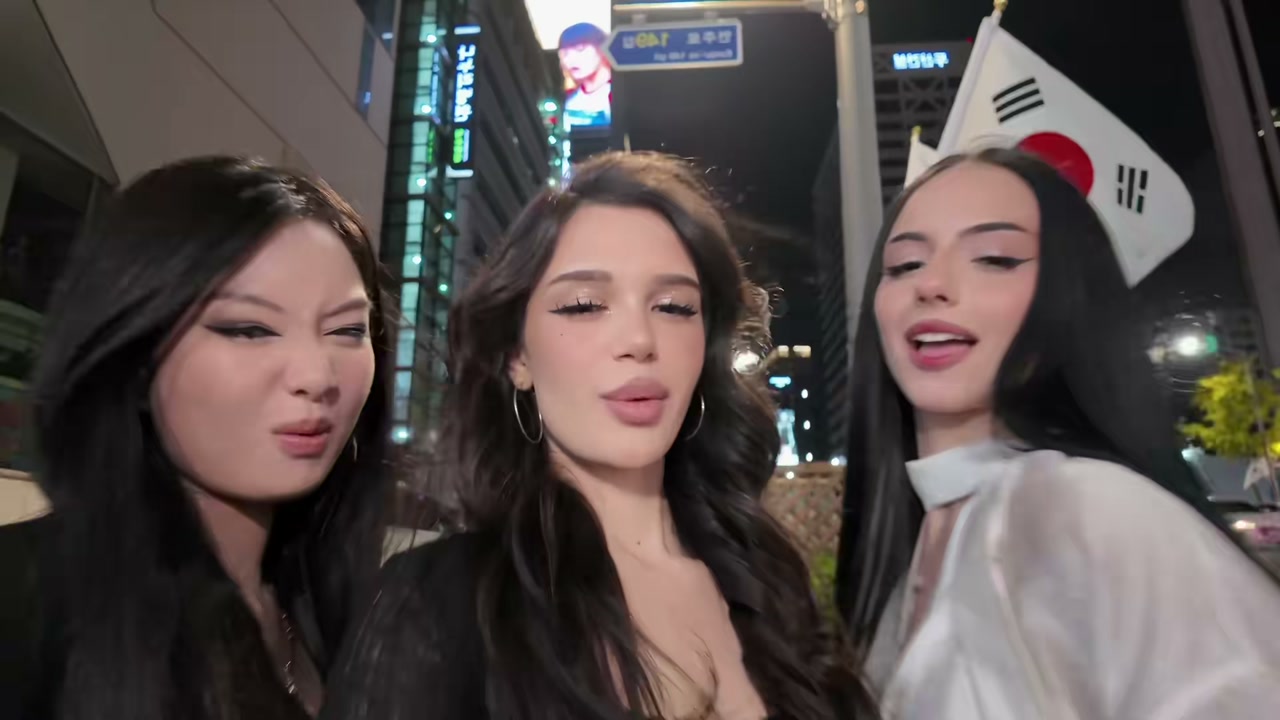
This template follows the night-street selfie format associated with @emiliyyam’s “gangnam style in gangnam” TikTok. A later AI remake by @mxna.mxna credits that account. The creator’s original is shown above so you can see the gestures and camera moves before choosing your photos. This identifies a source for the current AI format; it does not establish who first invented every version of the challenge.
Although it uses the same song, this clip is different from a full performance of PSY’s horse-riding dance. Expect close-up lip-syncing, playful gestures, a moving phone camera and three friends taking turns. You do not need to learn the choreography or record a video yourself.
YOUR CAST, THEIR CAMERA MOVES
You · center
Required. You open the selfie and return after your friends’ solo turns.
Friend · right
Optional. The person on the right in the opening shot takes the second solo.
Friend · left
Optional. The person on the left in the opening shot takes the third solo.
Positions refer to the opening shot
One photo to start. Up to three to make it yours.
Your photo goes in the center slot because that person holds the camera and leads the selfie. The two other slots are named after where the friends stand in the opening group shot. In the real reference, the friend on the right wears a light blouse and gets the second solo; the friend on the left wears black and gets the third. These roles stay attached to those people even when the camera moves.
Want a solo joke? Upload only your own portrait and join the two original performers. Want the whole friend group? Fill all three slots with different photos. You can also replace just one friend. Leaving a spot empty keeps that person from the reference rather than creating a random stranger or duplicating your face. There are still three people in the group scenes in every version.
Use a separate, clear portrait for each slot. A face looking toward the camera, visible hair and an upper body give the generator useful detail. Even lighting is better than a face hidden by sunglasses, a hand or a heavy filter. The tool uses photos of people in this version; use your own photos or portraits you have permission to use.
ONE CLIP. SAME SONG.
14seconds
The camera handoff and the song stay together
The prepared reference uses the first 14 seconds of the creator’s clip without speeding up the performance. It keeps the opening group, each solo and the return to the center. The clip ends there, before the full source’s group finale. The song comes from the same interval, so it is added on the same timeline after the picture is generated. There is no need to find a second audio file or edit a track into the download.
The output is a 16:9 landscape MP4 requested at 720p. That wide frame leaves room for all three friends instead of squeezing them into a narrow crop. You can share it as a horizontal clip, or frame it inside a vertical post in your own editor. Check the faces, hands and lip movements before sharing, because AI can alter details during the fast selfie pans. MemeClip does not add a watermark.
Third-party AI remix with a different cast, costumes and setting. The shot order also differs from the human reference. This example was not generated with the MemeClip tool.
Same idea, a completely different cast
Give the group chat a new cast
Try the friend who always takes the selfie in the middle, the most dramatic lip-syncer on the right, and the friend who insists they cannot dance on the left. The short solo turns give each person a different moment without needing three separate recordings. A birthday group, travel crew or reunion photo set can make the same familiar chorus feel personal.
The costume remix above shows how far people take the format. Its terrace setting, costumes and camera order are different from the street performance used by this tool. This page’s generator uses the human street reference. Your uploaded portraits provide the new appearances; the reference supplies the performance and setting.
ONE VIDEO, YOUR WHOLE CAST
20credits / video
What one video costs
A new 14-second video costs 20 credits, whether you replace one, two or all three people. The button shows the current price before you start. If that price changes while the page is open, you will see the new amount and need to confirm it by pressing Create again.
A generation confirmed as failed returns its credits. If the status is unclear, check the existing task before starting another one. Making another version after a completed video is a new generation. Download a copy within 30 days, and treat a shared result link as access to that video.
A FEW THINGS BEFORE YOU START
Before your trio takes the camera
Do I have to upload three photos?
No. Start with one photo for yourself in the middle. The right and left slots are optional. An empty friend slot keeps that original performer; filling it replaces them throughout the clip.
Will one photo make three copies of me?
No. One photo replaces the center performer only. The two other reference performers stay in the video unless you add their replacements.
Can I change which friend is on which side?
Yes. Put each portrait in the slot you want, using the opening group as the guide. Removing a right-slot photo leaves your center and left photos in place. It does not move another person across the lineup.
Is the music included?
Yes. The matching Gangnam Style audio from the reference is added after rendering. You do not need to upload a song, and this is not an AI clone of your own singing voice.
Is it free, and what if it fails?
Creating a video uses 20 credits. A confirmed failed generation returns those credits. If you see a request that needs checking, refresh its status first so you do not accidentally start a second video.
Does MemeClip put a watermark on the download?
MemeClip does not add a watermark. You get an MP4 with the matching song once the video and soundtrack are ready.
Can I upload my cat or a group photo?
Use one person per image for this version. For a cat or dog dance, try the Toc Toc or Babydoll template linked below. A crowded group photo makes the intended identity harder to identify.
Who can see my photos and video?
Your selected files are kept in a local browser draft for up to an hour so you can return after signing in. Generation sends them to the video service. Anyone you give the result link to can view it; download your own copy within 30 days. If you use phone transfer, keep its temporary link private too.