From your camera roll to the hotel room
Pick the person
Choose a clear photo of one adult. A full-body picture shows the outfit; a half-body photo also works as a starting reference. Keep the face easy to recognize.
Let the phone unfold
Sign in, check the credit cost and create. The template already supplies the room, the dance and the phone movement. You do not need to film or write a prompt.
Play it with sound
Watch through the phone toss, then download the MP4. The original reference sound is included. Add a short caption in your editor or social app if you want to share the joke.
What is the iPhone Kupi Dance AI trend?
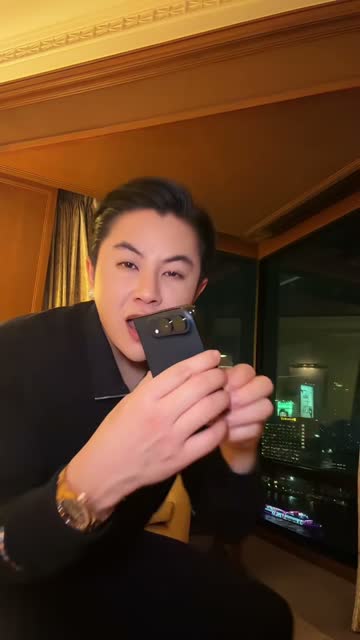
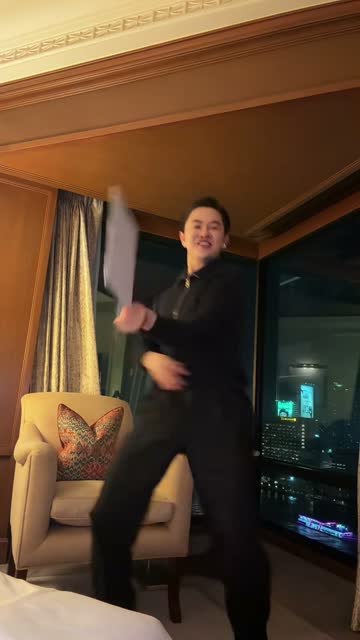
A small folding phone enters the shot, then keeps opening until the screen looks almost too large for the person holding it. The dancer backs away from the lens, moves to the Russian hook and handles the device with far more confidence than most of us would. A warm hotel room and a night-time window make the whole scene feel oddly glamorous. The humor comes from that contrast: a luxury-looking setting, a very serious phone reveal and an increasingly silly dance.
The reference here comes from a post on Win William’s account. This template uses the first fourteen seconds, with the opening reveal, the step back and the main dance and toss movement. Your photo supplies the new performer. If you have seen the phrase “iphone koopi dance,” it usually points to the same sound and phone gag. The AI version lets someone join the scene without finding the room or performing the routine.
A recognizable face starts with a readable photo
Choose a picture you would recognize as a small thumbnail. The face should be facing the camera, with both eyes visible and enough light to separate the hair from the background. A half-body or full-body photo gives the model useful information about the person and their clothes. Leave some room around the shoulders and, if the whole body is visible, keep the hands and feet inside the frame. One clear subject is easier to follow than a group photo with several possible leads.
You do not need to hold a phone in the input. An empty-handed portrait can be a better choice than a selfie where a handset covers half the face. Avoid strong beauty filters, sunglasses and screenshots with text over the person. This page is designed for an adult human dancer; it has no pet or group mode. For a friend’s version, ask them to choose a photo they are happy for you to upload, rather than pulling one from a private conversation.
Four beats: reveal, unfold, dance, toss
00:00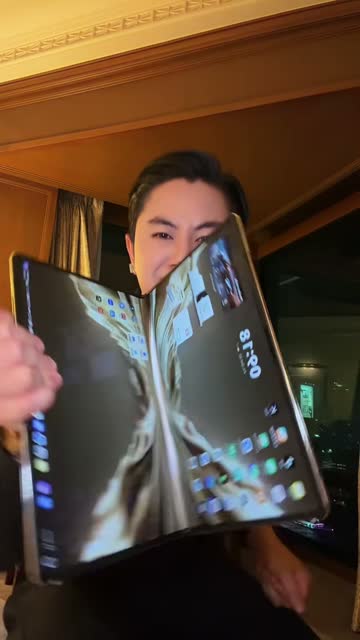 00:04
 00:0800:12
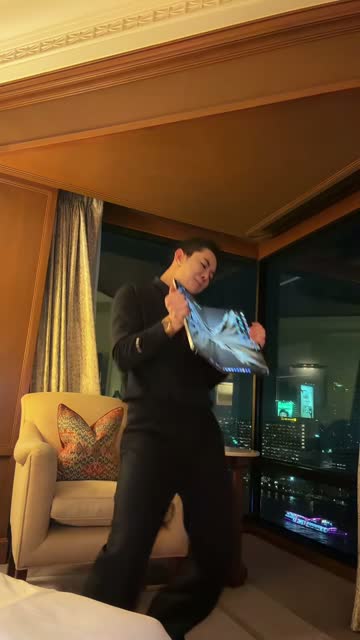
The frames above follow the selected reference in order. The opening brings the folded device close to the camera. The next image shows the oversized screen fully open. Further back in the room, there is enough space to see the stance and side-to-side movement. The last frame catches the closing swing and toss sequence. The changing distance makes the joke work: first the screen fills the shot, then the whole body becomes part of the performance.
The camera and hotel setting are fixed by the template. Your upload is the appearance reference for the performer, while the source video guides the movement and the phone’s path. Choose your photo for the person you want to see in that scene, rather than for a matching hotel background. When the result is ready, watch the unfolding and the hand-to-phone contact as well as the face. These are the moments that make a phone dance feel connected instead of like a moving portrait.
Keep the face visible as the screen gets bigger
A phone held near the lens can cover much of the dancer’s body. That is part of this particular joke, so the face has to remain recognizable before and after the screen passes in front of it. Hair shape, a clear neckline and a distinctive outfit help give the person continuity. If two photos are equally sharp, prefer the one with natural light on the face and fewer objects across the chest. You are choosing an appearance reference, not recreating the room in your own home.
AI can change facial details, fingers, clothing and the shape of the device during fast movement. Watch the full clip once before sharing, especially the big unfold and the toss. A funny take can still work as an obvious AI remix without every small detail being perfect. If you want to try a different photo afterward, that is a new generation. Keep the downloaded version you like so you can experiment with its caption without requesting another render.
Give the phone reveal a reason to be dramatic
The easiest caption is often a familiar situation: the friend who always wants the newest gadget, the person who treats a small purchase like a product launch, or your own reaction when an old phone finally works again. The oversized screen supplies the visual punchline. Let it have a moment before adding much text. A short line outside the video can set up the joke without hiding the hands or the device near the camera.
For a birthday, try a photo of the adult who always volunteers to dance first. Pair the original photo with the finished clip so friends can see who has stepped into the room. A serious portrait makes a particularly funny introduction to the confident dance. Download the MP4, then put the photo and video together in your editor. Keep the phone reveal at its original pace and try placing the caption above the scene, where it leaves the unfolding screen visible.
The Russian hook is part of the punchline
1 adult photo · 14 seconds · Vertical 720p · MP4 with sound
“iPhone kupi” comes from the Russian lyric “Айфон купи,” meaning “buy me an iPhone.” The song is “Базовый минимум” by Sabi and MIA BOYKA, often translated as “Bare Minimum.” That explains why a video built around a folding device still carries the iPhone name. It is the sound’s nickname and the meme’s label, rather than a way to choose a real phone model. You do not need to speak Russian to follow the reveal and the dance.
Your MP4 includes the same fourteen-second sound segment as the reference, synchronized to the original pace. The file is vertical, 720p and ready to download with audio. Listen once before posting: if your social app adds a second copy of the song, mute one track to avoid an echo. MemeClip does not add a watermark. Keep a saved copy before trying different captions, trimming the ending or changing the mix in your own editor.
THIRD-PARTY AI EXAMPLE
A different person, the same oversized reveal
This third-party AI example shows a fictional woman doing a version of the hotel-room phone dance. It demonstrates the recasting idea; it was not generated by MemeClip. Its outfit, timing and audio can differ from this template.
What one dance costs
The current price is 20 credits per video, displayed beside the create button. Sign in to use your balance. Making another version uses credits again, so choose the photo before you start. If a generation is confirmed to have failed, its credits are returned. For a request still processing or being checked, use Refresh status before starting over. If only the sound or final saving needs another try, that button finishes the existing video without requesting another paid generation.
Choose the photo; keep your own copy
Your selection can stay in a local draft on this device for up to one hour to carry it through sign-in. The photo is sent for processing when you generate. Check the background for anything you would prefer to crop out, and use a photo you have permission to upload. Finished videos are available to download for thirty days. Save the MP4 if you want to keep it longer. Someone with the result link may be able to open the video, so decide who receives it. The privacy policy explains the handling in more detail.
Before you take the phone
Do I need a folding phone or a dance video?
No. Upload one photo of an adult. The template supplies the folding device, hotel scene and reference movement.
Can I use a photo of a friend?
Yes, with their permission. Choose a clear photo of one adult, with their face visible. A half-body or full-body picture is a useful starting point.
Is this the “buy me an iPhone” song?
Yes. The hook comes from “Базовый минимум” by Sabi and MIA BOYKA. This template includes the selected reference’s original sound segment.
What do I download?
A 14-second vertical 720p MP4 with sound. It follows the selected part of the reference, rather than the entire untrimmed social post.
Can my cat do this one?
This page is for one adult human. For a person or pet dance, try Mi Chico Dance or the Babydoll template linked below.
Does it cost credits if the video fails?
Generation uses the displayed credits. They are returned if generation is confirmed to have failed. Refresh a request still processing or being checked before sending another one.
Does MemeClip add a watermark?
MemeClip does not add a watermark to your video.
Can I change the room or the phone color?
The room and phone are part of the fixed reference. Your photo changes the performer; this page has no room or phone-color controls.
Will the face and hands look exactly right?
AI may change details during the unfold and toss. Watch the full clip and compare it with your photo before sharing.
How long do I have to save it?
Download within 30 days and keep your own MP4. Anyone who has the result link may be able to open it.