01
What happens in the My Girl Couple Trend AI reveal?
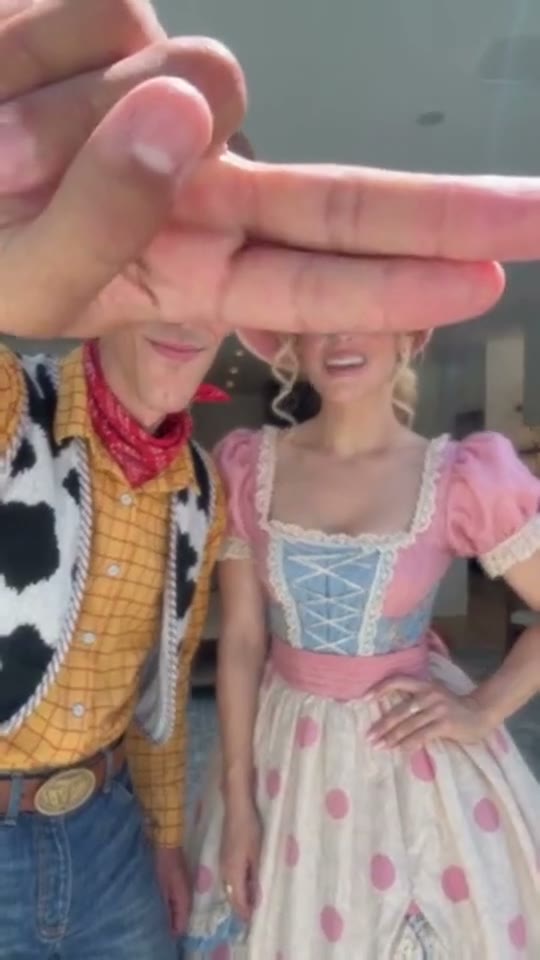
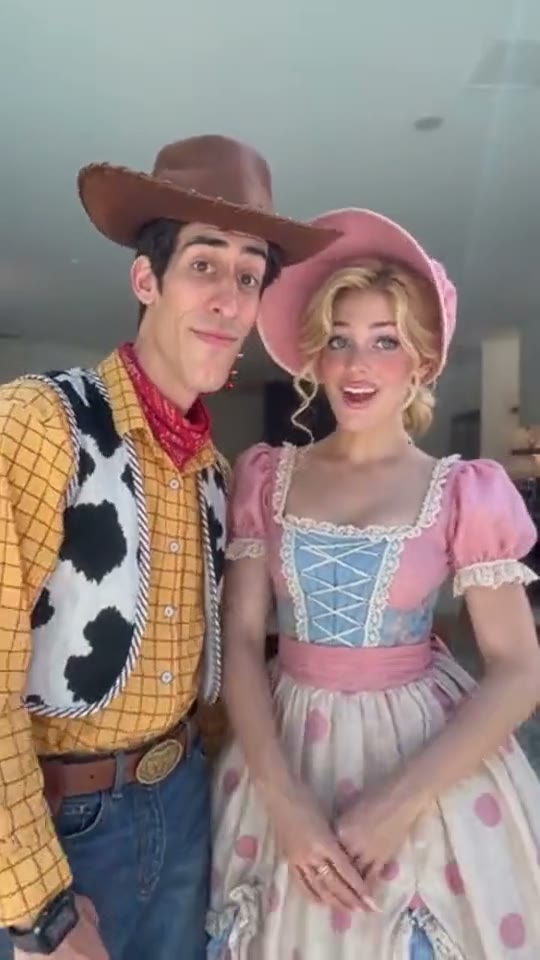
The moment to watch is the hand leaving the frame. Before that, two people stand side by side with their eyes hidden behind a hand that looks far too large for the scene. When it lifts, both faces appear together and the pair lean closer with a smile. The change from a silly obstruction to an affectionate ending gives this short video its shape. It works with a partner, a close friend or someone who always ends up beside you in every group photo.
This page builds that sequence from two still portraits. It asks for a separate image of each person so the model has a clear identity reference for each side. You do not need to record the gesture yourself or write a video prompt. The intended output is a ten-second vertical clip with a short pause before the reveal. Small movements and facial details can vary between generations; the reference shows the format, not a guaranteed identical result.
02
Choose portraits that still look like you
Start with the faces, not the background. A sharp, evenly lit portrait is more useful than a beautiful holiday photo where the person occupies a tiny corner. Aim for the head and shoulders or chest up, with the whole face visible. Leave a little space above the hair and around the cheeks. Heavy sunglasses, a hand over the mouth, motion blur and strong face filters make it harder to judge whether the finished reveal resembles the person you chose.
The two source pictures do not have to be taken together. Similar lighting and a similar camera angle are helpful, though. A front-facing indoor portrait pairs more naturally with another front-facing portrait than with an extreme side profile taken at night. If your favorite picture contains both of you, make two separate crops before uploading: one clear face in each. Keep enough resolution in those crops to see the eyes and mouth without guessing.
03
Upload, set the order and generate
The first slot supplies the person on the left. The second supplies the person on the right. Check the little previews before you begin, especially if you are making a surprise for someone who always expects their usual side of the camera. The swap button changes the order without submitting a job. Replacing a photo also stays local until you press the generation button. Use the permission checkbox only after both adults have agreed to this use of their pictures.
Sign in, check the current credit cost shown by the tool, and start the video. The page creates a task that you can check again while it is processing. Allow it to finish before trying another combination. When the result appears, play the whole clip once before saving it. The opening, the moving fingers and the final smiles all matter; a flattering last frame alone does not tell you whether the transition worked.
04
Read the reveal in three beats
The first beat establishes the joke: one hand close to the lens seems big enough to cover both people. This is a forced-perspective image, so the hand should read as a foreground object. It should not appear to squeeze either head. The middle beat holds that obstruction long enough for the viewer to wonder who is behind it. The last beat clears both faces and gives the pair a little time to smile together.
Our direction aims for the hand to leave at roughly seven seconds, followed by an unobstructed ending. AI timing can drift. When reviewing a result, look for a complete withdrawal instead of fingers remaining over one eye, and check that each person keeps their identity on the same side. If you later trim the video for a post, preserve enough of the opening for the reveal to make sense. Cutting straight to the smiling pair removes the visual setup.
05
Couples, best friends and everyday occasions
You can make the ending affectionate without turning it into a relationship announcement. For a couple, a short caption about an anniversary, a reunion or a very ordinary good day is enough. For best friends, the payoff might be the familiar look you give each other before laughing. The template does not require a kiss, matching outfits or a particular pairing. Pick pictures that feel like the two people you actually want to show.
A small caption often works better than a long explanation across the faces. You could put a question above the opening hand and let the ending answer it, or save the words for the post caption. Keep names and other personal details out of the video unless both people want them shared. Before sending it to a group chat, let the other person see the finished version. The final expression is generated, so they may prefer a different photo or a private keepsake.
06
The original sound is already in your video
New videos include the ten-second sound from the reference post, credited as “som original - woody cria”. It plays from the beginning of your clip, keeping the opening pause and the reveal in the same order. You do not need to search for a music track or add one before downloading. When the page says the sound is being added, let it finish: the download appears once both the picture and the sound are ready. If that step needs another try, use Check status rather than starting a new video.
Play your saved copy with sound before you share it. Check that the hand clears both faces and that you can hear the ending as the two people lean together. Keep captions away from their eyes and mouths, and leave room for the app’s buttons around the edge. If you trim the clip, keep the audio and picture together so the waiting beat still leads into the reveal. Preview the exported file in the app where you are posting and apply any required AI-content label.
07
Price, progress and saving your video
The price beside the Generate button is what one new video costs. You can choose photos, replace them and swap their positions without spending credits. Only start when you are happy with both portraits and their order. If you want another finished version, that is a new video at the price currently shown, even when you keep the same pictures. The waiting time depends on how busy the video service is, so leave your first video running rather than starting several copies.
If the page stops responding or your connection drops, tap Check status before you try again. Your video may already be on its way. A failed or canceled video gives your credits back automatically. When the page says it is still checking, wait for the next update instead of tapping Generate repeatedly. Once your video is ready, open it, watch the full reveal and save a copy to your device. Results stay in your account for thirty days, but a temporary download link can expire sooner.
08
Film a simple version with your phone
If you are together, you can also try a practical camera version. Stand side by side with room around your heads, place a phone securely at about chest height, and have a friend hold one hand close to the lens. Check the screen to align the fingers across the eye line without touching either face. Lock the framing, record a short pause, then lift the hand cleanly upward while the pair lean together and smile.
Real filming gives you direct control over the exact expression, gesture and outfits. The photo tool is useful when you have separate portraits or cannot arrange a shoot together. Either way, keep the reveal simple. Too many costume changes, camera moves or extra people distract from the same little payoff: the hand leaves and the person beside you finally comes into view. Choose the approach that matches the photos, time and company you have available.
Practical questions
How do I make My Girl Couple Trend AI from photos?
Upload one portrait per person, check who is on the left and right, confirm permission, and sign in. Review the displayed credit cost, then generate. Play the result and save it while the download link is available.
Can I upload one photo of us together?
This page requires two image files. If you only have a joint photo, crop it into two portraits with one clear face in each, then upload those separately. A tiny crop with blurred facial details is less useful than a new portrait.
Does it work for two friends?
Yes. The scene is a two-person reveal and does not require a romantic relationship, a kiss or matching clothes. Choose two adults who agreed to appear together, and let both review the generated result before posting.
What should I check if a face changes?
Check both faces before, during and after the hand movement. Try sharper front-facing portraits without heavy filters, sunglasses or another face in the crop. A new generation costs credits; inspect your source pictures before starting it.
Does my video include the original sound?
Yes. New videos include the ten-second sound from the reference post, “som original - woody cria”. It is already in the video you download, so you do not need to add a track yourself. Wait until the page finishes adding the sound before saving the result.
My video is still loading. Should I try again?
Tap Check status first: your video may still be processing even if the page lost connection. If it fails or is canceled, your credits come back automatically. If the page says it is still checking, wait for an update before tapping Generate again.
Can I change the photos without paying?
Yes, choosing, replacing and swapping pictures does not start generation. Credits are used when you submit a video. Generating another version is a new paid request at the price currently displayed.
How should I save and share the result?
Open the successful video and save a local copy promptly. Results stay in your account for thirty days, while temporary links can expire sooner. Check both people are comfortable with the clip, then add captions, music and any required AI label before posting.