Your Paws at You video in three steps
Pick the face
Start with one photo you can recognize at a glance. A cat with visible markings, a dog with a clear muzzle or an adult facing the camera gives the scene a readable main character. Leave a little room around the head and shoulders instead of cropping tightly through the ears or chin.
Let the paw do the asking
The scene and movement are already chosen: green grass, pink petals, large glossy eyes and a paw held toward the viewer. You do not need to describe the action. Check the photo preview, sign in and use the displayed credit price to start your version. Keep the page open while it is working.
Save the reaction
Play the finished clip once with sound and once while watching the face and paw. If you like it, download the MP4 and save a copy on your phone. Add your short request in the app where you post it, so the words arrive with the expression rather than covering it.
Why Paws at You asks so nicely
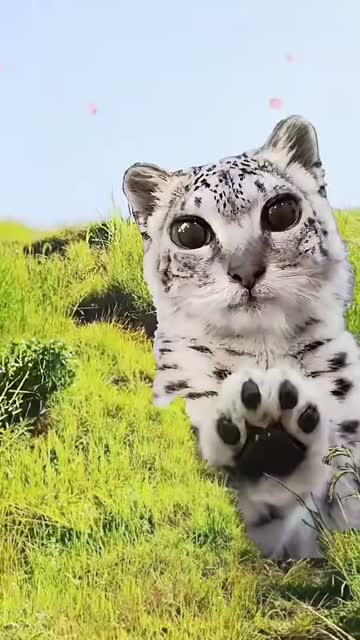
The joke is a small request delivered with an impossibly earnest face. A snow leopard with huge, shiny cat eyes looks straight at the viewer and raises a soft paw, as though it could tap through the screen. The usual caption, “*paws at you*”, reads like a little stage direction. Add “hop online?” or “one more game?” and the image does the pleading for you.
The familiar snow-leopard version borrows the exaggerated, round-eyed look associated with Mei Mei cat edits. The still-image joke has also become a moving reaction: a lean toward the lens, a tiny head tilt, a paw close to the camera and a blink. Our selected scene takes that movement into a bright meadow with drifting petals. It keeps the gentle, slightly ridiculous request clear even when somebody watches without sound. This is a short reaction template, so choose a message that can land in a glance.
Give the eyes and paws enough room
For a cat, look for a picture taken at its eye level, with the ears, both eyes and muzzle in focus. The distinctive markings around the nose and forehead help make the result feel like your animal. A dog can use the same idea: a front-facing view, good light and enough of the chest to suggest where the front legs belong. Avoid a photo where the animal is carrying a toy over its face.
A person should use an adult portrait with an unobstructed face and visible hair. In this version, the person wears a fluffy snow-leopard outfit with paw mittens while the face stays human. Choose a relaxed expression rather than an extreme grimace. Group pictures, tiny faces in a distant landscape and strong beauty filters make identity harder to read. Cropping a busy photo to one subject before uploading is often more useful than choosing a higher-resolution picture of several people.
The expression, frame by frame
00:00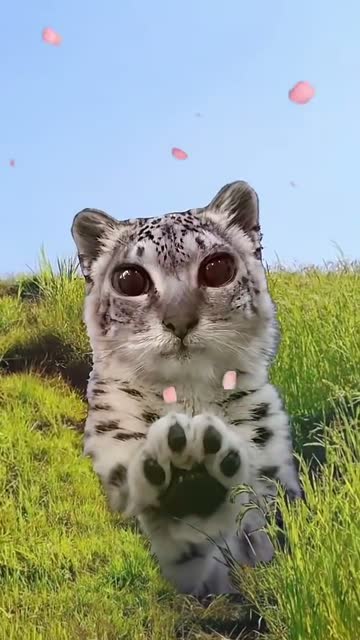 00:02
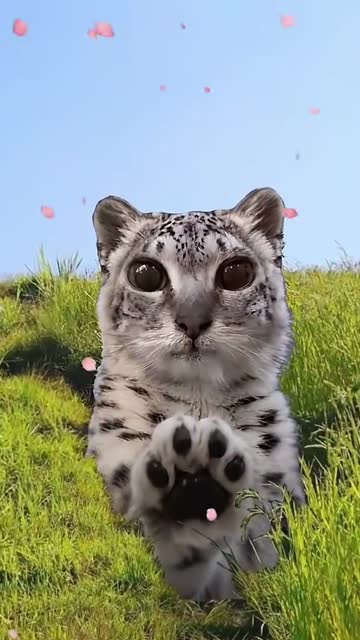 00:0500:07
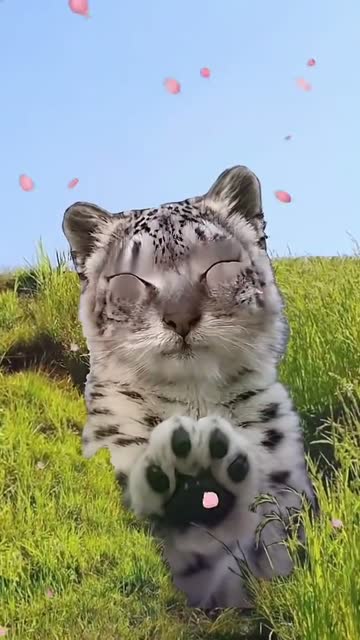
The four stills below come from the exact segment used for movement. The opening already brings the paw close to the lens; the following moments keep the eyes facing forward while the paw subtly changes position. By the last still, a blink softens the expression. Perspective makes the near paw look much larger than the body, which is part of the visual joke.
Notice how much of the face remains readable behind the paw. That is the detail to look for in your own result, along with a clear connection between the paw and the foreleg or arm. It should look like a gentle reach for attention. Before sharing, watch for an extra limb, changing markings or an eye that drifts as the head turns. A still preview cannot show every movement, so play the complete eight seconds.
Eight seconds, with the reference sound
The downloadable result is a vertical 9:16 MP4 at 720p. Its eight seconds follow the selected reference at the original pace, and the matching source audio is added after the visual render. This keeps the reference sound with the scene rather than asking the model to invent a new voice or song.
Start with the speaker low when checking a clip on your phone. If you want different music or your own spoken punchline, add it in your usual editor after downloading. The tool does not supply character voices, record your microphone or place a caption inside the video. The exported picture has no added MemeClip watermark.
A reaction for the group chat
Use the paw as a polite interruption. Send it when you want friends to join a game, when somebody has forgotten the snacks or when you are campaigning for one more episode. The line can be as small as “five more minutes?” A familiar pet makes the request funnier because the group already knows who usually gets away with that expression.
For a birthday conversation, try a playful request for a slice of cake. For a pet account, pair the clip with a recurring request such as dinner or a spot on the sofa. With friends, each person can make a separate clip and send the replies in sequence. The generator uses one uploaded subject per video; a chain of separate reactions works better than squeezing a whole group into the same photo. Keep the joke kind and make sure the person whose face you use is comfortable with it.
Leave space for the punchline
1 photo · 8 seconds · 720p · vertical MP4 · original-speed sound
The meme needs very little writing. Put a short caption beside the post or above the video in your social editor, with room for the eyes and the near paw. A long paragraph competes with the expression. If you repeat “*paws at you*” before the request, read the line out loud once to check that it sounds like something you would actually send a friend.
This page exports MP4, not GIF. For a silent chat sticker or a Paws at You GIF, convert your saved copy in an editor that supports it. Preview the converted file before sending: a heavily compressed GIF can lose the eyes and fur detail that make the reaction work. Keep the original MP4 so you can use it again at better quality.
THIRD-PARTY REACTION EXAMPLE
Another way the paw joke can look
This published kitten example shows another take on a paw reaching toward the viewer. Its setting and framing differ from our meadow reference. It is included to show the broader reaction idea, and it was not generated by MemeClip. For the exact movement used by this tool, use the snow-leopard preview at the top of the page.
Check the credits before you start
One generation costs 20 credits, shown beside the create button. There is no free-generation promise hidden behind the upload box: choosing a photo prepares your version, while starting the render uses credits. A different version is another generation at the price shown when you create it.
If a generation is confirmed as failed, its charged credits return to your account. If the page is still checking what happened, refresh the existing request instead of submitting the same photo again. That lets you recover the result you already asked for without accidentally starting another version. Use the displayed creation code when contacting support about a stuck request.
Keep a copy, and choose who gets the link
Your selected photo is used to create the video; it is not automatically added to a public gallery on this page. A local photo draft can remain in this browser for up to one hour to help you return after signing in. Remove or replace the selected picture when you want the next version to use a different subject.
Generated videos are retained for 30 days, so download anything you want to keep. Treat a result link as something you choose to share: somebody with that link may be able to open the video. Save your own copy before sending it to a group, and use the original file rather than an old link when you need the reaction again later.
Before you send the paw
Can I use my dog instead of a cat?
Yes. Choose one cat or dog with its face and chest clearly visible. The template aims to keep its recognizable face and fur while adding the big-eyed expression and paw reach.
Can I put myself in it?
Use a clear adult portrait. The person version keeps a human face and adds a fluffy snow-leopard outfit with paw mittens. One photo supplies one main subject.
Is it free to make?
Generation uses credits. Check the price beside the button before starting; selecting a photo does not start a paid render.
Will there be a watermark?
MemeClip adds no watermark to the exported MP4. Keep text and logos out of your input photo if you do not want them influencing the picture.
What happens if generation fails?
Credits return when the generation is confirmed as failed. If its status is unclear, refresh that request first instead of starting another one.
Does it add the “paws at you” words?
No text is burned into the video. Add your request in the caption or in the editor where you share the clip.
Can I make a GIF for chat?
Download the eight-second MP4 and convert your copy to GIF elsewhere. This tool exports a 720p vertical video with the reference sound.
Does it include character voices?
The selected reference audio is included. Character dialogue, voice imitation and custom music are not options in this template.
Can my friends and I use one group photo?
Choose one subject for each clip. Friends can each make a separate reaction and share them together; a group photo can make it unclear whose face should appear.
How long can I download the result?
Videos are kept for 30 days. Save your MP4 before then, and share the result link only with people you want to see it.