One photo, one very awkward coffee break
Choose your first-timer
Pick a photo of yourself or an adult friend who is happy to be in the joke. A clear face and an unobstructed upper body give the character a useful starting point. You do not need to hold a coffee, sit on furniture or record yourself acting. Check the selected picture before continuing; it will supply the person on the left.
Check the cost and create
Sign in, review the credit cost beside the button and start the video. The cafe scene already includes the second person and the small round tables. Your photo takes the left role through the sideways glance and climb down. Leave the request to finish and check its status here if it takes a little longer.
Watch the whole joke
Play the result with sound from the beginning. Check the face during the sideways glance, the cup in the hand and the moment the feet reach the floor. When you are happy with it, save the MP4 to your device. Keep both people in view when posting: the woman’s ordinary seat is what makes the mistake obvious.
What happens in Your First Time in a Fancy Cafe?
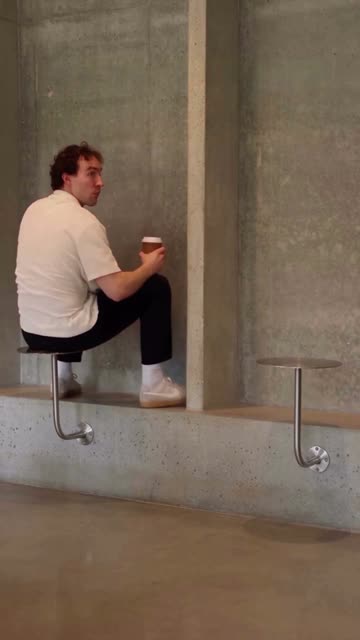
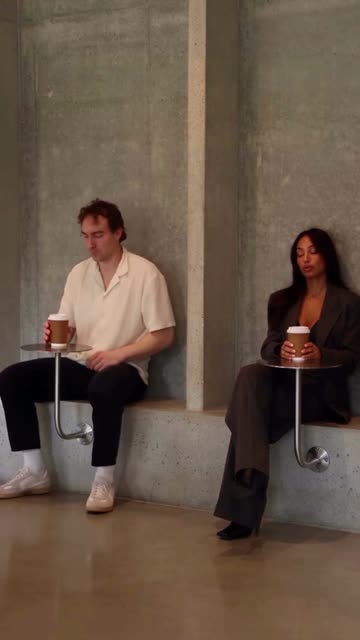
Your First Time in a Fancy Cafe turns unusual furniture into a small social disaster. A visitor is already perched on a little metal disc, cup in hand, facing the concrete wall. Then a woman arrives and sits on the low bench beneath her own disc. Suddenly the layout makes sense: those high circles are tables. The visitor has to get down without looking as embarrassed as they feel.
The scene works because nobody needs to explain it. One person looks completely at home; the other tries to copy her after committing to the wrong seat. There is no dance routine to learn and no long speech to deliver. The pause before the correction gives friends time to recognize your face and realize what is about to happen. That quiet, unconvincing attempt to act normal is the punchline.
Give the sideways glance a recognizable face
Choose a recent picture where the face is large enough to see clearly, with light across both eyes. A half-body or full-body portrait is helpful because clothing and build are visible too. A simple shirt, jacket or jumper can make the character easy to recognize without competing with the cup and furniture. Use a picture with just one adult rather than a group photo with several possible faces.
The reference includes a profile, a downward look and a small turn. A frontal or slight three-quarter portrait gives a better starting point than a face hidden by hair, dark sunglasses or a hand. You can upload another picture before generating if the preview looks too small or blurry. The selected photograph changes the protagonist; you do not need a cafe background in it.
Four moments that carry the scene
00:00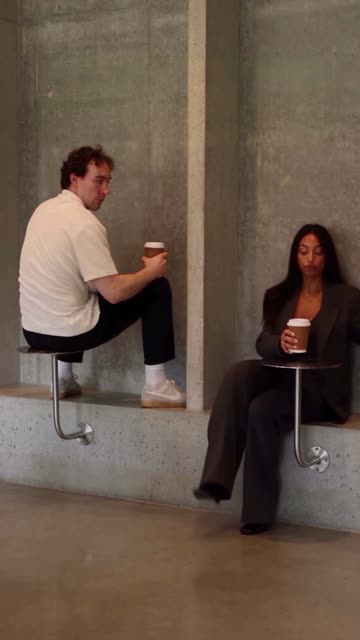 00:04
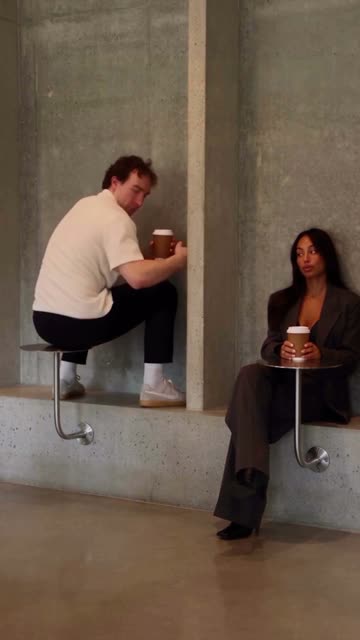 00:1000:13
At the opening, the left character is still convinced that the tabletop is a seat. Four seconds in, the woman is sitting normally and the comparison is clear. Around ten seconds, the protagonist starts shifting down from the higher disc. By the last moment, both people are on the bench and the cup has found its proper place. Watch the frames above to follow that change in posture.
This version uses a continuous 14-second selection at the source’s original pace. It keeps the waiting, recognition and correction together instead of jumping directly to the fall in confidence. If you add your own caption after downloading, keep it short and away from the faces. Explaining the furniture too early can give away the joke before the woman sits down.
Two people, one role for your photo
Your upload plays the visitor on the left. The woman on the right stays from the reference, along with the concrete cafe, bench and metal tables. You only choose one photograph, so there is no second face to assign or seating chart to fill in. This is useful for a quick solo joke even though the finished scene contains two people.
Look at the transition from tabletop to bench as closely as the face. Hands, cup edges and feet can change during AI movement, especially when the character passes in front of the table support. A recognizable portrait helps, but you should still watch the entire result before sending it to friends. The preview beside the tool shows the intended sequence and framing.
Who always picks the complicated cafe?
Make yourself the person who insists they understand the menu and then cannot work out the seating. Send the result to the friend who always chooses the most minimalist coffee shop, or use it as a reply after somebody suggests a particularly stylish place. The contrast works just as well with a smart office portrait as with a relaxed weekend photo.
For an adult friend’s birthday, ask before using their picture and let them see the clip first. A simple line such as “me trying to look like a regular” gives the scene a personal angle. You can also save the video for a group chat after a real coffee outing; a shared memory often makes the quiet embarrassment funnier than a long caption would.
Let the pause land before the correction
1 adult photo · 2 people in the scene · 14s · 720p vertical MP4
The downloaded video includes the selected reference’s sound, synchronized to the same 14 seconds. Play it once with audio before sharing so you hear the scene as well as seeing it. You can change the volume or add a caption later in your preferred editor. Keep the original pace when you want the woman’s arrival and the protagonist’s reaction to remain together.
The file is a vertical 9:16 MP4 at 720p, suitable for a phone screen. Avoid cropping tightly to the left face: viewers need to see the other person and both kinds of furniture. When adding a platform caption, place it above or below the action rather than across the cups or hands. Save an untouched copy first so you can try a different edit later.
THIRD-PARTY AI EXAMPLE
A different cast, the same seating mistake
The separate clip shown here is a third-party AI example. Its people look different from the action reference, but the wrong seat, sideways look and careful descent remain easy to follow. Compare the two clips to see why recognizable casting matters more than adding a complicated setting. It is an illustration of the remix idea, not a video generated from your upload.
Our selected reference is 14 seconds; the example has a longer lead-in and ending. Use the four storyboard frames to see the part this template follows. Your result will depend on the photo and the generation, so check your own face and movement rather than expecting the example’s exact appearance.
The cost of one cafe scene
Creating a video uses 20 credits, with the current cost shown beside the button before you start. Making another version with a different photo is a new generation. Take a moment to check the selected picture first, particularly if several portraits in your camera roll look similar.
If generation is confirmed to have failed, the credits for that attempt are returned. A request that is still processing or being checked needs a status refresh before you start another one. If the picture has finished but sound or saving needs another try, refresh to complete that same result.
Choose your photo and keep your copy
The photo you select can stay in a draft on this device for up to one hour, including while you sign in. It is sent for processing when you generate. Use a picture you have permission to upload, and remove it from the tool if you decide to choose someone else. On a shared device, check the selected photo before leaving.
Download the completed MP4 within 30 days and keep your own copy. A result link can be opened by someone who has it, so send it only to people you want to see the clip. Review the video before sharing a friend’s face, and give them the same chance to decide where it goes.
Before your first awkward coffee
Do I need a video of myself?
Just one clear adult photo. The template supplies the cafe, movement and the woman on the right; your photo plays the person on the left.
Can I put a friend in the other seat?
This version changes only the left protagonist. The woman on the right stays from the reference.
Can I use a pet photo?
Choose an adult human for this cafe scene. For a pet dance, try Mi Chico Dance below.
How much does it cost?
Check the credit cost next to the create button. The default is 20 credits per generation; the displayed cost applies when you start.
What happens if generation fails?
Credits return when the attempt is confirmed to have failed. If it is still processing or being checked, refresh its status before starting another video.
Does the clip include sound?
Yes. The selected reference audio is added to the 14-second video at the original pace.
What format will I get?
A 14-second vertical 9:16 MP4 at 720p. Download your copy within 30 days.
Will there be a watermark?
MemeClip does not add a watermark.
Can I change the cafe or add a caption?
The cafe is fixed for this template. Add your own caption to the downloaded MP4 in your preferred editor.
Who can see my photo and video?
Your selected photo is sent for processing when you generate; its local draft lasts up to one hour. Anyone with the result link may be able to view the video, so share that link with care.